


What if you could combine a supplier with unbeatable prices and a store that’s fully yours?
That’s the idea behind Walmart to Shopify dropshipping. On one side, Walmart gives you access to a massive catalog of competitively priced products. On the other, Shopify lets you build a fully branded store where you control the customer experience from start to finish.
It’s a powerful combo. But to really make it work, you need a way to link both sides and manage everything efficiently. That’s where automation changes the game. AutoDS acts as the bridge that connects Walmart to your Shopify store while streamlining the entire workflow.
In this guide, we’ll walk you through:
- How this dropshipping model works in practice.
- The step-by-step setup from Walmart to Shopify.
- How to automate and grow without getting overwhelmed.
By the end, you’ll know exactly how to turn this setup into a scalable business.
Walmart is a strong supplier for U.S.-based dropshipping, offering fast shipping, competitive prices, and products backed by high customer trust.
Shopify gives you full control over your store, from branding and design to pricing strategy, allowing you to build a more personalized and scalable e-commerce business.
Dropshipping from Walmart to Shopify works best when operations are streamlined, since manual order handling and stock monitoring can quickly become overwhelming.
AutoDS automates Walmart to Shopify dropshipping processes, helping you reduce errors, save time, and focus on scaling your store
Step-by-Step Guide to Start Dropshipping from Walmart to Shopify
Walmart to Shopify dropshipping works best when you understand the role each platform plays.
👉 Walmart works as your source, offering competitively priced products, fast U.S. shipping, and a trusted retail reputation as one of the best American dropshipping suppliers that helps you deliver a smoother buying experience.
👉 Shopify acts as your selling channel, giving you full control over your store, from branding and design to pricing and customer experience. Unlike general marketplaces, you’re building an asset that’s entirely yours.
👉 AutoDS connects both sides, automating product imports, price and stock updates, and order fulfillment, so you’re not stuck managing everything manually.
Put together, this setup gives you the flexibility of your own store, the reliability of a U.S.-based supplier, and the efficiency of automation.
Now, let’s walk through the exact steps to get your Walmart to Shopify dropshipping business up and running.
1. Log in to AutoDS

Ok, it’s time to bring everything together. And that starts with AutoDS.
This platform acts as the link between Walmart and Shopify, allowing you to automate product imports, sync inventory, and manage orders from a single place.
Once you’re logged in, you’re ready to start building your entire workflow. And if you’re just getting started, the $1 trial is a simple way to kick things off.
2. Set Up Your Shopify Store

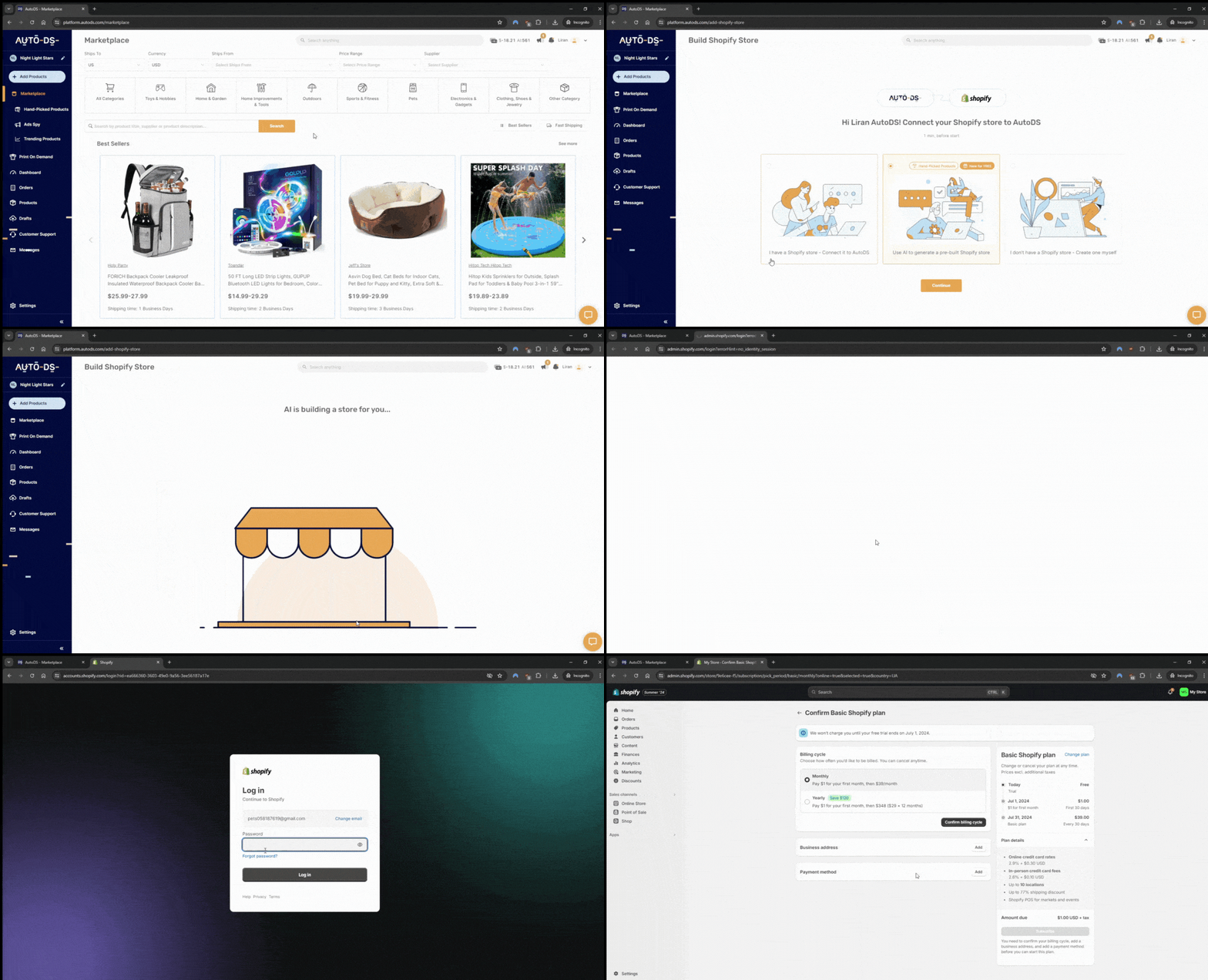
You might already have a Shopify store, but if not, creating one from scratch isn’t as hard as it sounds. And if the idea of building a store feels overwhelming, don’t worry, I’ve got you. With AutoDS’s AI Shopify Store Builder, your business can be ready to go in just a few minutes. You can always customize the look, feel, and layout later.
3. Integrate AutoDS with Shopify
Now it’s time to sprinkle in some automation magic. Connecting Shopify to AutoDS takes just a couple of clicks. Head to the AutoDS marketplace, select “Add Store,” choose Shopify, and follow the easy, intuitive steps.
Once integrated, you’ll be able to manage everything directly from your AutoDS dashboard, including all Walmart orders placed through your store. It’s simple, centralized, and smooth.
4. Conduct Product Research

All this is great, but have you decided what you’re going to sell? The niche and products you choose will have a huge impact on your results. Walmart to Shopify dropshipping is really about selecting the right products that resonate with your audience and attract new customers. Here are a few smart ways to do it:
- Use the AutoDS product research tool to find top-performing Walmart items, especially trending or fast-selling ones.
- Check Google Trends to see how a product is performing across different audiences and seasons.
- Focus on Shopify-friendly niches that tend to do well with branded stores. Think trendy fashion, accessories, home decor, and similar categories.
5. Import Products from Walmart

Once you’ve chosen your winning items, it’s time to get them live in your store. And with AutoDS, the process is so simple it almost feels unreal. Just paste the Walmart product URL into the blank field under “Add Product” in the AutoDS marketplace, and boom, you’re done.
💡 Pro Tip: Take your product pages to the next level using the AutoDS AI Title & Description Generator! The way you present your product can make a huge difference in conversion rates.
6. Set Up Shipping and Fulfillment
Before you officially open your virtual doors, you’ll want to make sure the backend logistics are in place so that your operation runs smoothly from day one:
- Connect your payment gateways like Shopify Payments, PayPal, or Stripe to ensure your customers can pay you easily and securely.
- Define your shipping settings. Since Walmart has different shipping times depending on the product and seller, you’ll want to make sure your Shopify shipping profiles match expected delivery windows. AutoDS helps here by syncing Walmart shipping details directly to your store settings.
- Enable automated order fulfillment within AutoDS. This will allow the tool to place Walmart orders on your behalf, pull tracking numbers, and update your Shopify orders—without manual input from you.
7. Time for the big moment!
Once you’ve connected everything, uploaded your products, and set up shipping and payments, hit that Publish button and shift your focus to traffic and marketing.
Here are some smart ways to bring in those first waves of visitors:
- Create TikTok or Instagram content around trending Walmart products—especially in categories like home, gadgets, or lifestyle.
- Partner with niche influencers who can spotlight your brand or test your products.
- Run paid ads on Facebook, Instagram, or Google to drive traffic to product pages.
- Use email capture tools on your site to build a list and send follow-ups or discount codes.
While you’re out there bringing in customers, AutoDS takes care of the rest: orders, inventory sync, and tracking updates, so you can focus on scaling instead of babysitting backend tasks.
Why Dropshipping from Walmart to Shopify Makes Business Sense
Now that we have covered how the setup works step by step, it’s easier to understand why this model is so popular among dropshippers.
Walmart’s catalog offers a strong advantage when it comes to logistics. Since many products are shipped from U.S. warehouses, your customers receive their orders quickly, which is a huge advantage in today’s fast-paced e-commerce world. Yes, faster delivery equals happy buyers, positive reviews, and fewer complaints.
On the other side of the equation, Shopify gives you something marketplaces usually don’t: full control. With Shopify as your selling platform, you get to define how your store looks, feels, and sells. That freedom means you can price products based on value rather than competition, and build an end-to-end customer experience that truly reflects your brand identity.
Of course, running this setup manually can get complicated. Managing orders, updating listings, and keeping track of stock across platforms takes time and attention. That’s why automation is such a critical ally.
Another thing to keep in mind is that high-volume or repetitive purchasing patterns on supplier platforms like Walmart can sometimes trigger delays or cancellations. Using AutoDS to help organize and automate your workflow can make a big difference as your store grows.
When It Works Best
With that in mind, let’s look at the scenarios where this model truly delivers:
- You’re targeting U.S.-based customers: Most Walmart items ship from domestic warehouses, ensuring fast and reliable delivery, key to keeping customers happy.
- You’re selling name-brand or trusted products: Walmart’s catalog includes popular, recognizable brands that add instant credibility to your store.
- You want complete storefront control with Shopify: Combining Walmart’s products with Shopify’s customization options lets you build a unique, branded shopping experience.
- You’re ready to automate operations: With tools like AutoDS, you can streamline imports, fulfillment, and inventory updates to save time and reduce errors.
- You’re operating at a small-to-medium scale: Walmart is ideal for manageable order volumes; high-volume sellers may face order flags or account issues.
AutoDS: The Ultimate Bridge Between Walmart and Shopify

Let’s face it: manually managing product sourcing, pricing, and fulfillment between two platforms can get messy fast. That’s where AutoDS steps in, not just as a tool, but as the ultimate bridge between Walmart and Shopify.
Here’s how it keeps your Walmart to Shopify system running smoothly:
- Automated order fulfillment and tracking: With AutoDS, you don’t have to log in to Walmart and manually copy customer details for each sale. The platform automates order placement and even pulls tracking information as soon as it’s available. That means your customers stay updated, and your store complies with expected delivery times.
- Real-time stock and price monitoring: Walmart prices and inventory change frequently; if you’re not monitoring them constantly, you risk overselling or losing profit. AutoDS tracks these changes and updates your Shopify store accordingly, no more guesswork or late-night price edits.
- Easy product importing with built-in filters: Adding products from Walmart to Shopify is quick and customizable. Just paste a product URL, or use bulk import tools, and AutoDS takes care of the rest, images, descriptions, variants, and more. Plus, you can apply filters and rules to ensure only the most relevant or profitable items make it to your store.
- Order processor avoids canceled orders: Walmart isn’t exactly dropshipper-friendly, especially regarding multiple or high-volume orders. AutoDS’s order processor helps prevent cancellations by routing purchases through managed buyer accounts and spreading out order volume to avoid red flags.
Can You Make Money Dropshipping Walmart Products on Shopify?
The short answer is: yes, you can. But success hinges on execution and smart strategy. Let’s examine why this model remains profitable in 2026 and what key factors drive results.
- Market Size & Upside: The global dropshipping market is projected to reach around $435 to $476 billion by the mid-2020s, with a 22–28% annual growth rate. Walmart-to-Shopify is a proven segment within this booming space, especially for vendors targeting U.S. buyers wanting fast, reliable delivery.
- Faster Fulfillment = Lower Costs: Dropshipping businesses experience up to 24–48 hours speedier order fulfillment than traditional ecommerce models, with 75% fewer stock-outs. Faster delivery leads to fewer complaints, fewer refunds, and lower support costs, meaning more repeat customers and healthier profit retention.
- Healthy Profit Margins (10%–30%): Dropshipping profit margins typically range between 10% and 30%, with many sellers averaging around 15–20% per sale. Even on relatively low-cost items, say, a $20 product, this can translate to $3–6 per sale. As volume scales, these margins compound into impressive income streams without the need to hold inventory or manage shipping.
At the end of the day, profitability in this model comes down to how smoothly your operation runs behind the scenes.
With tools like AutoDS handling product imports, price updates, and order fulfillment, you can process more orders with fewer errors and way less manual work. And when everything just flows, protecting your margins stops feeling like a challenge and starts feeling like the next logical step.



Frequently Asked Questions
Is Walmart dropshipping allowed on Shopify?
Yes, you can use Walmart as a supplier for your Shopify store, but keep in mind it’s not officially dropshipper-friendly. Using automation tools like AutoDS helps keep your operations discreet and compliant.
Can I automate Walmart order fulfillment?
Absolutely, AutoDS has a dedicated order processor for Walmart that handles order placement, tracking, and even returns, saving you loads of manual work.
How do I prevent Walmart from canceling my dropshipping orders?
To reduce cancellations, avoid placing too many orders to the same address, steer clear of high-risk products, and use AutoDS’s order routing to spread purchases across accounts.
What are good alternatives to Walmart for Shopify dropshipping?
Good alternatives to Walmart for Shopify dropshipping include AutoDS supported platforms like AliExpress, CJdropshipping, or Banggood. Each one offers different advantages depending on your strategy. For example, broader international catalogs, access to unique products, or more flexibility when sourcing at scale.
📦 Supplier’s Tip: Looking to expand beyond Walmart? Check out our guide on dropshipping from Shopify to CJdropshipping to explore a more global sourcing option with custom branding and faster international shipping.
Start Dropshipping from Walmart to Shopify Today
Now you’ve got the essentials to start your Walmart to Shopify dropshipping journey. Remember, with smart product research, well-planned marketing strategies, and—most importantly—by taking full advantage of automation, you can build sustainable, long-term growth.
AutoDS is what turns this from a good idea into a system you can actually run (and scale without burning out). Instead of getting stuck in repetitive tasks, AutoDS keeps your products updated, your orders moving, and your workflow under control as things grow.
And that shift matters. Because when you’re not tied up fixing listings or chasing tracking numbers, you can focus on the bigger picture: testing new products, refining your store, and building something that lasts.
👩🏻💻 If you’re ready to put everything into motion, the next step is simply getting your setup running. Starting with the $1 AutoDS trial is an easy way to connect and see how automation fits into your Walmart to Shopify business.
If you’re still curious about the wonderful world of dropshipping, don’t hesitate to dive into one of the articles below.